
Advanced Planning & Scheduling
Maximise resources, eliminate bottlenecks, and increase throughput with production scheduling tools.
Key business benefits
Related Resources
Manage and Monitor your Shop Floor Schedule and Work Centre Capacity
Acumatica Manufacturing Edition’s Advanced Planning and Scheduling (APS) allows manufacturers to consistently and cost-effectively meet customer demands by setting accurate and reliable delivery dates based on finite resource availability. Optimise manufacturing production by managing resource constraints, including materials, production capacity, process sequences, tooling, and facility schedules.
Advanced Planning and Scheduling software provides essential planning capabilities, real-time insights into production, and the ability to accurately schedule employee and machine resources. It allows you to determine requirements for materials and capacity while providing efficient use of production assets.
FINITE CAPACITY SCHEDULING
Know how much work can be produced in a given timeframe, considering various resources and demand limitations.
ROUGH CUT CAPACITY PLANNING (RCCP)
Verify that you have sufficient capacity available to meet the capacity requirements for your master schedule.
CAPABLE TO PROMISE (CTP)
Access Capable to Promise (CTP) from sales orders and quotes to calculate availability dates for manufactured items considering constraints and lead times.
VISUAL SCHEDULING
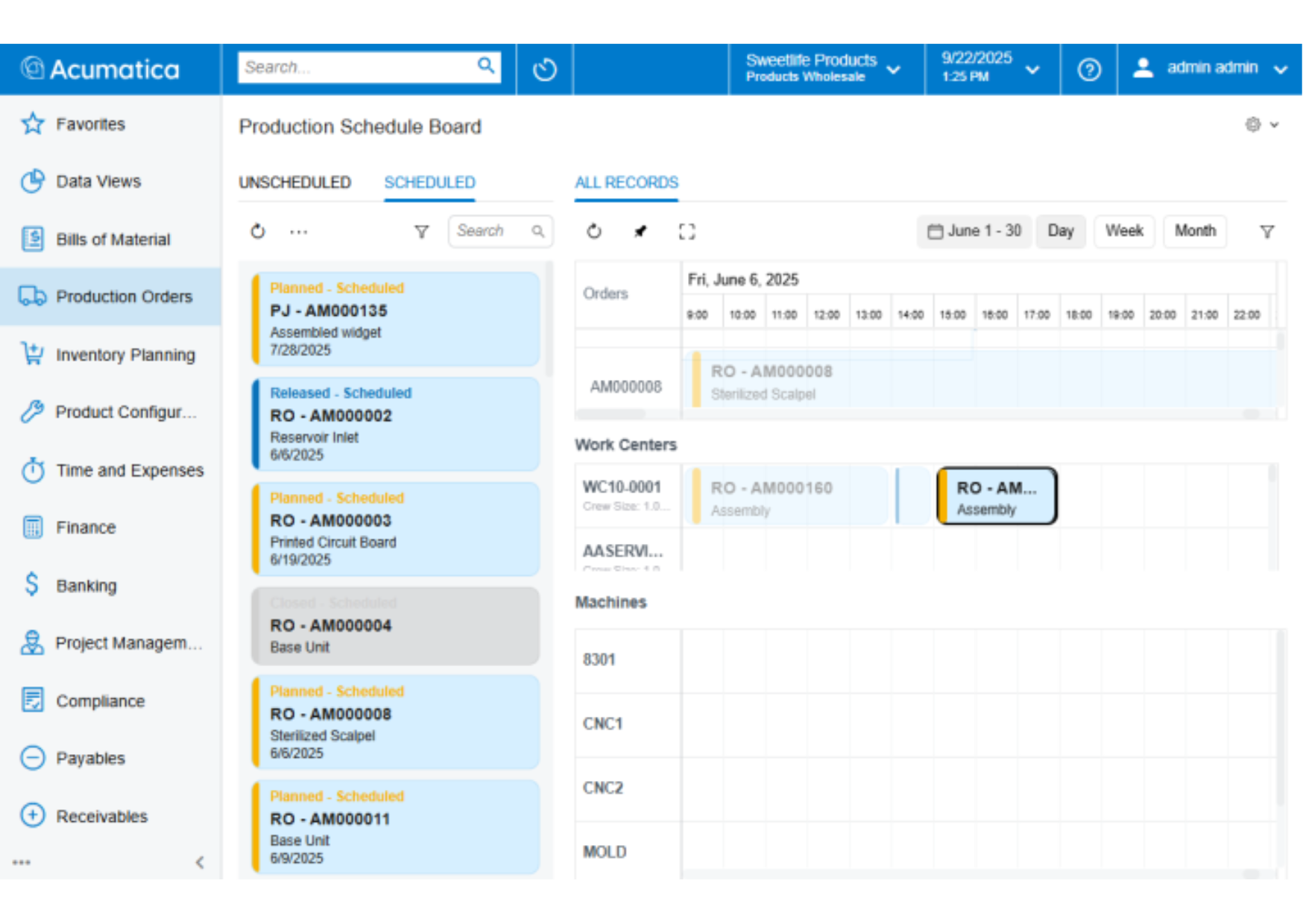
Visualise your production schedule with a graphical view of production order operations by work centre and machine.
We were running blind before. Now, we can see volume, location, type of product, and managers can prepare and put new orders into the production schedule.
–Tim Patton, ICT Director, SAM
Resource Capacity
Use rough-cut capacity planning (RCCP) to plan, monitor, and manage work centre, machine, tool, and labour capacity. Finite scheduling considers operation durations based on crew sizes and labour efficiency.
Rough-Cut Capacity Planning (RCCP)
RCCP schedules open production orders against finite capacity constraints. Optionally, the orders selected can be released. Orders are loaded and scheduled in sequence based on priority, constraint dates, and production order numbers. The availability of material is considered including supply orders such as purchase orders, transfer orders, or component production orders. Planners may exclude planning orders from RCCP to focus only on actual production orders.
Capable to Promise (CTP)
Use Advanced Planning and Scheduling to determine how many units of an item will be available by a specified date or calculate availability dates for a quantity of items based on finite capacity constraints, material availability, and vendor lead times.
Dispatch Lists
Utilize work centre and machine dispatch reports for a clear view of scheduled production orders and operations. View reports identifying required resources for scheduled production orders.
Visual Schedule Board
Visualise your production schedule with a graphical view of production order schedules by work centre and machine. Visual scheduling enables users to view scheduled operations against work centres and machines for individual production orders or all orders simultaneously.
Firm Schedules
Firm schedules to lock in planned production operations for work centres and machines.
Scheduling Utilities
Use filters to locate production orders by sales order, scheduling status, and other criteria. Identify work centre and machine capacity with built-in histograms. The color-coded schedule makes it easy to identify production orders and operations.
Queue, Finish, and Move Time
Improve scheduling precision by defining finish, move, and queue times for manufacturing operations that require cooling, drying, movement to upstream operations (such as outsourced manufacturing services), and other expected non-production scheduling time.
Scheduling Changes
Adjust constraint dates and priorities and firm schedules from the visual schedule board.
Real-Time Insights
Gain insights into production schedules with real-time data from the shop floor feeding role-based dashboards, live Generic Inquiries, and actionable Business Events for push notifications when scheduling issues require immediate action.