
Sales Order Management
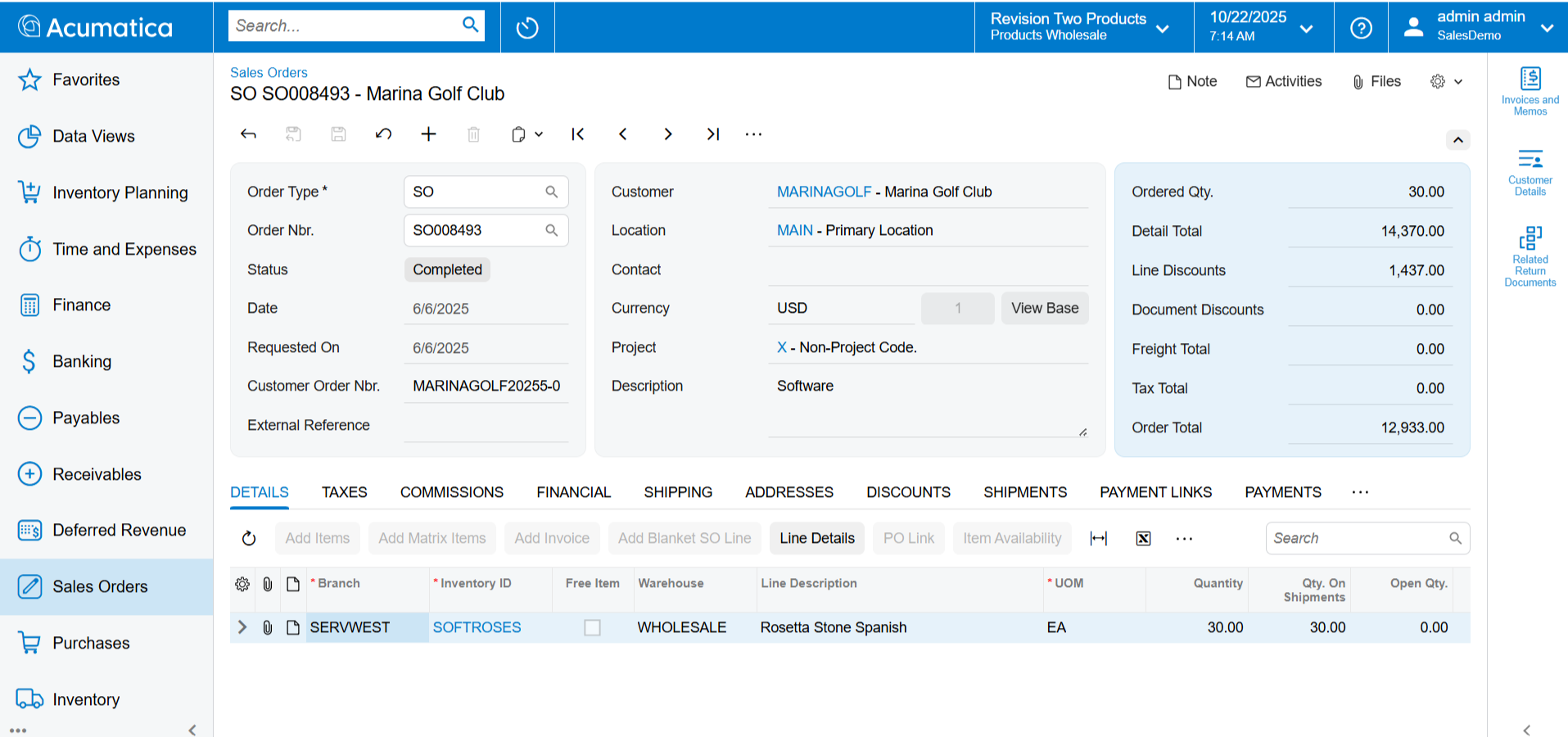
Streamline ordering, fulfilment, and delivery processes by empowering sales and service with real-time data to improve customer service.
Key business benefits
Related Resources
Improve Order, Fulfilment, and Delivery Processes for Happier Customers
Centrally manage sales activities for quote entry, order fulfilment, shipment creation, pricing and discounting, and inventory stock status. Empower sales and service departments with real-time data to improve customer service.
AUTOMATE SALES ACTIVITIES FOR BETTER CUSTOMER SERVICE
Order Suggestions. Boost sales with item substitution, up-sell, and cross-sell suggestions.
Integrated Workflow. Automate order processing and eliminate unnecessary steps with Acumatica integrated workflow. Configure order status, status changes, actions, notifications, and alerts to trigger during order processing.
Flexible Discounts and Promotions. Manage complex customer and vendor pricing and discount policies. Set up quantity and volume discounts as a percent or an amount. Specify multiple discount rules and sequences or automatically allow the system to apply the best discount combination.
Configurable Order Types. Predefine order types tied to specific order processing requirements. Specify inventory allocation rules, workflow scenarios, and documents generated in Accounts Receivable and Inventory Management.
Multiple Entry Points. Create orders from sales order entry, import files, or convert quotes to sales orders. Integration with EDI, commerce, and retail point of sale systems are supported through Open APIs.
The quote to cash cycle is the lifeblood of our business, and Acumatica has given us the tools to manage it effectively and efficiently every step of the way. We have valuable tools to see what’s coming, to do all our forecasting through dashboards, and focus on key customers.
–Tim Patton, ICT Director, SAM
System-Wide Integration
Sales Order Management integrates with Customer Relationship Management, Inventory Management, Requisition Management, Purchase Order Management, Accounts Receivable, Production Management, and Field Service Management.
Inventory Allocation
Configure inventory allocation rules for each step of the sales process with warnings for over-allocated or unavailable items.
Invoice Consolidation
Consolidate multiple shipment orders onto a single invoice. Optionally update price and discount details on review before invoice printing and updating accounts receivable.
PO Linking
Link sales orders with purchase orders—allocate received items to orders. Generate purchase orders automatically or link them manually. Auto-hold sales orders until receiving a purchase order or create drop-ship purchase orders from vendors directly to customer locations from sales order entry.
Real-Time Inventory
Get real-time inventory data, including allocated inventory. Acumatica will notify the user if the quantity is unavailable or over-allocated during a sales order entry.
Returns Management
Return Merchandise Authorization (RMA) features allow you to receive goods from customers. RMA orders can be processed as a credit or replacement for damaged goods with reason codes.
Multiple and Partial Fulfilment
Fill orders from more than one warehouse. Split a sales order into multiple shipments from different warehouses based on availability and costs. Track partial ship order balance and manage backorders.
Shipment Schedules
Specify delivery dates for each line item on a sales order. Generate shipment orders according to the delivery schedule and item availability. Restrict shipments for on-hold orders.
Blanket Sales Orders
Generate releases from blanket sales order contracts with predefined order quantities, dates, and ship-to locations.
Counter Sales / Mixed Orders
Process sales and returns on a single sales order to streamline walk-in warehouse counter sales and returns where customers may buy and return products at the same time.
Pick Lists and Replenishment
Generate pick lists based on item availability and warehouse location pick priority. Auto-search warehouses, issue replenishment orders, and place orders on hold until the goods arrive.
Credit Limit Verification
Before releasing a sales order, Acumatica verifies the customer’s credit limit. Orders placed on credit hold are automatically released if a customer payment is entered or the order amount is decreased. Authorised users can override the credit hold status and force order fulfilment.
Custom Workflows
Use workflows to automate and modify the quote to sales order conversion process, update sales order status, return and replacement process, and pick, pack, and ship processes.
Cross-Company Transactions
Streamline cross-company buy-sell transactions by automatically creating a sales order in one company from a purchase order in another company. Cross-company transactions generate the purchase receipt in the buying company from the shipment in the selling entity and create the sales invoice in the selling company when the bill is created in the buying company.
Item Suggestions
Boost sales with defined item substitution, up-sell, and cross-sell suggestions during sales order and quote entry. Up-sell and cross-sell features are also available for online orders.
Role-Based Dashboards
Stay on top of your business with role-based dashboards for sales managers and shipping clerks.
Side Panels
Distribution side panels provide users with direct access to customers, items, and order details for sales orders, shipments, invoices, and more.