
Inventory Management
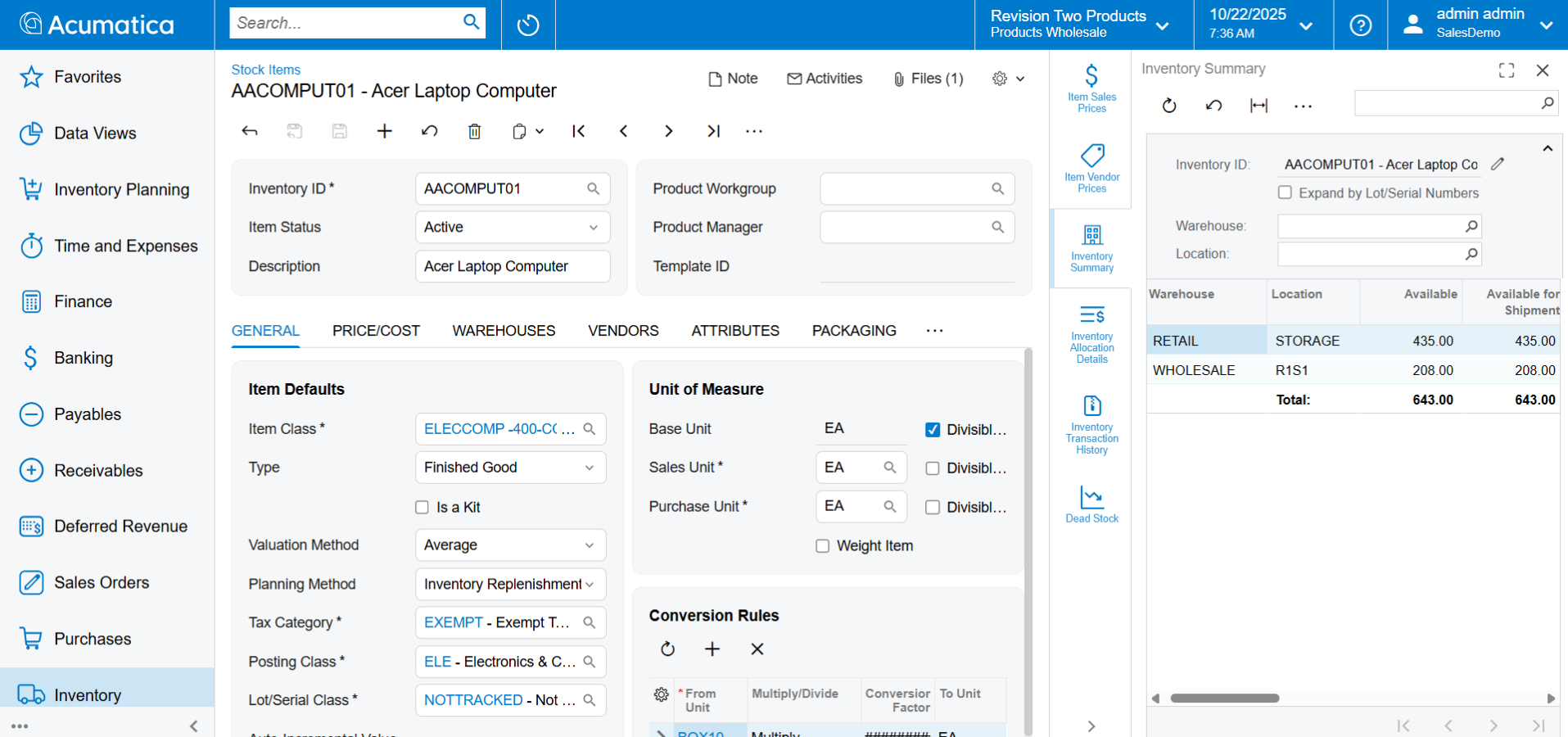
Simplify inventory processes with flexible item management, quality traceability, and robust replenishment to balance supply and demand. Optimise stocking levels to avoid rush orders and stock-outs with increased inventory turns and lower carrying costs.
Key business benefits
Related Resources
Manage Inventory Effectively with Advanced Replenishment and Flexibility
Control inventory across warehouse locations. Use powerful replenishment logic for automated orders. Simplify item and inventory management with features designed to flex to how you manage your warehouse and distribution centre.
FLEXIBLE AND POWERFUL INVENTORY MANAGEMENT
Locations. Manage multiple warehouses with location-specific inventory quantities, allocations, availability, and costs. Define bins, use carts for picking and put-away, and set default locations for receipts, returns, and shipments. Use movement classes and ABC codes to optimise warehouse locations.
Item Management. Streamline item creation with matrix items using attribute variables. Build kits with flexible disassembly features. Setup cross-references between internal, customer, and vendor items with unit of measure conversions.
Inventory Management. Automatically distribute inventory from a central warehouse to other locations. Automate replenishment using min/max, economic order quantities (EOQ), safety stock, seasonality, lead times, and additional information to minimize carrying costs while maximising fill rates and turns.
Traceability. Track inventory by lot or serial number. Enter lot or serial numbers on receipt, issue, or assembly. Define shelf life for perishable inventory with expiration dates and first-expired-first-out picking.
Integrated Processes. Inventory Management integrates with General Ledger for financial reporting. Improve purchasing, sales, projects, field service, and manufacturing with automation, scheduled tasks, and custom workflows.
Acumatica tracks inventory in the right categories for us and provides for drill down to see the specifics on what’s behind the number. Acumatica is already doing more than our last system could, giving us a competitive edge.
–Holt Condren, co-founder and CEO, Ink! Custom Tees
Replenishment
Define min and max order quantities, reorder points, seasonality, lead times, safety stock, and forecast models to calculate replenishment.
Location Management
Setup and manage multiple warehouse locations with stocking locations for aisle, row, rack, slot, and bin. Define location defaults for receiving, returns, shipping, and other transactions. Prioritise pick locations by item and by the warehouse.
Matrix Items
Manage matrix item attributes for variables such as size, colour, and other attributes. Matrix items streamline item management, purchasing, and sales processes. Use matrix views to update prices and descriptions for matrix item product families.
Physical Inventory
Create movement classes and ABC rank codes to determine physical inventory frequency with flexible cycle counting.
Pricing, Discounts, and Promotions
Manage complex pricing and discount policies, including volume discounts and multiple discounts per item. Maintain policies for price overrides, customer pricing, and commissions.
Customer and Vendor Items
Define unlimited vendors by item with a preferred default vendor. Set a minimum frequency for deliveries and minimum or maximum order quantities by item for each vendor. Define cross references between internal, vendor, and customer items.
Packaging and UOM
Define variable packaging for inventory items with standard and configurable unit measure conversions for weight and volume.
Shipments
Manage shipments with small parcel carriers such as FedEx, UPS, Stamps.com (for United States Postal Service shipments), and LTL carriers with EasyPost.
Inventory Valuation
Value inventory using standard, average, specific (actual), or first-in-first-out (FIFO) costing methods. Manage current and pending standard costs with workflows to update costs and revalue inventory. View historical costs over time.
Kitting and Disassembly
Build kits to stock or to order. Disassemble kits into components. Perishable Inventory and Lot/Serial Traceability Use shelf life and expiration dates to manage perishable inventory with first-expired-first-out (FEFO) picking. Capture and create lot and serial numbers for traceable inventory.
Non-Stock Items
Manage non-stock items for product warranties, services, or labour. Non-stock item quantities are not tracked and may be received and returned without the Inventory Management app.
Dead Stock Detection
Maximize warehouse space and reduce carrying costs with the Dead Stock Detection Inquiry.
Stock Conversions
Improve operations by converting non-stock items to stocked items and vice-versa.
Turnover Inquiry
Optimise warehouse and retail operations with real-time inventory turnover insights for strategic replenishment, warehouse configuration, and improved inventory management.
Role-Based Dashboards
Manage your business with role-based dashboards for warehouse, purchasing, shipping, and receiving managers.
Side Panels
Side panels provide direct access to vendors, items, and order details for sales orders, shipments, purchase orders, receipts, stock and non-stock item maintenance, kit assembly, and more.
Barcodes and Labels
Connected apps automate data capture with native barcoding and flexible label printing for reports, business forms, and item or location labels.
Warehouse Transfers
Manually transfer product between warehouse locations or setup replenishment warehouses to automate transactions.
Optional Quality Management
Ensure product quality with the optional Quality Management Suite (QMS) for Acumatica. Define and perform quality tests during inventory receipt, shipping, kitting, production, or returns with certificates of analysis (COA), non-conformance (NC) tracking, and corrective and preventative action (CAPA) plans.