
Purchase Order Management
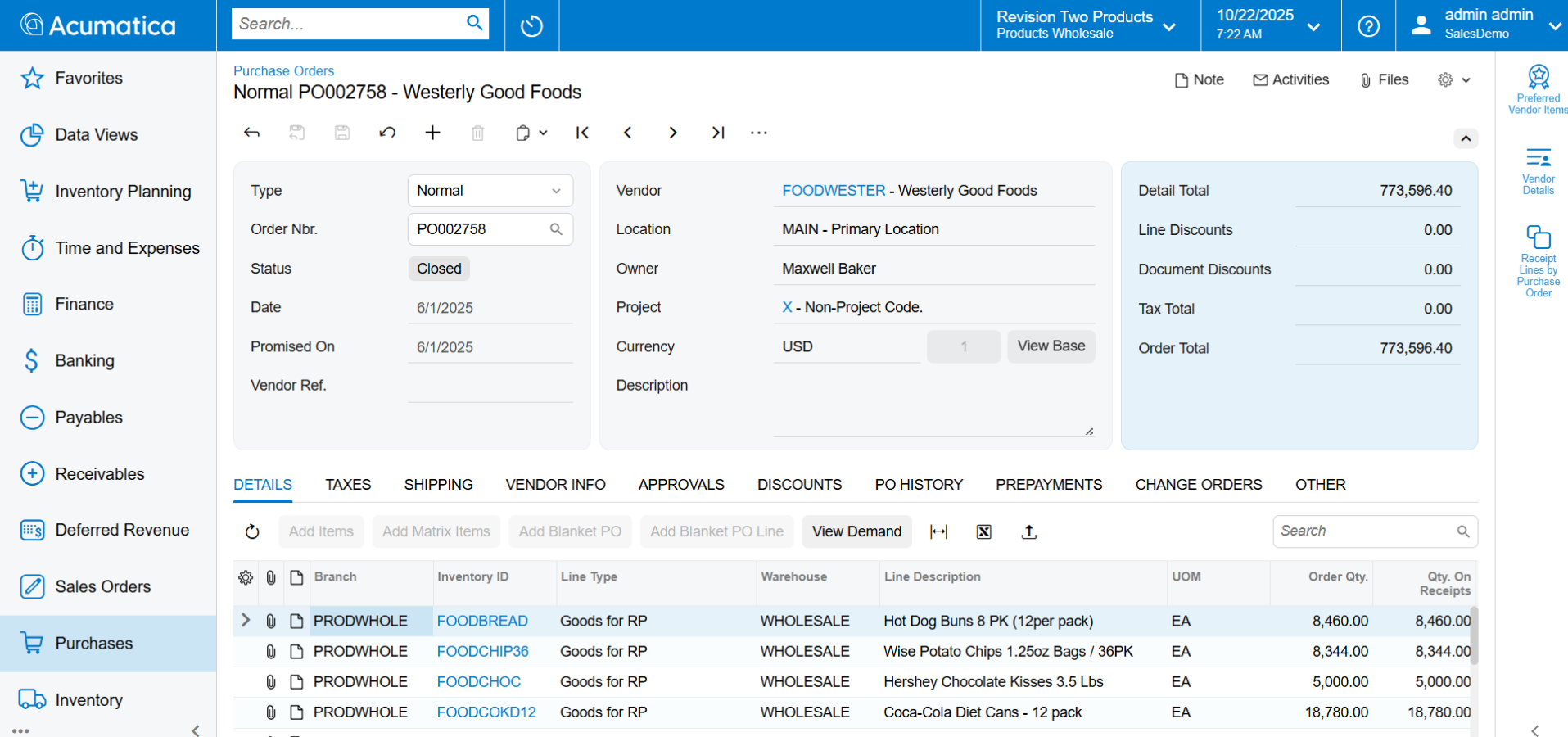
Harmonise your supply chain with flexible and automated purchasing connected to all parts of your business.
Key business benefits
Related Resources
Automate the Procurement Process from Vendor Quote to Invoice Payment
Acumatica Purchase Order Management helps reduce costs and improves vendor relationships by automating and centralising global purchasing processes. Streamline procurement processes to ensure a steady supply of materials while enforcing policy and process controls.
REDUCE COSTS AND CONNECT THE SUPPLY CHAIN
Automate Processes. Convert requisitions to purchase orders and automate replenishment using economic order quantities (EOQ), min and max, and vendor lead times to ensure product availability.
Minimise Costs. Integration with sales orders allows customer service to select the best vendor based on price or lead time to reduce costs and improve the customer experience. Reduce labour costs with receipt rules, barcoding, and automated email communications with vendors.
Connect Workflows. The Purchase Order Management module is integrated with all areas of Acumatica, including Sales Order, Requisition Management, Project Accounting, Service Management, Material Requirements Planning, Inventory Management, and Accounts Payable.
Improve Communications. Automated workflows improve communications internally with automated email and document transmittal for vendors.
Drop Shipments. Link purchase orders or drop-shipments directly to sales orders.
We know the pricing of 10 different vendors on the same product so we can compare them instantly and, depending upon those needs, satisfy whatever is the customer’s biggest priority.
–Patrick Madison, CFO, Korpack
Partial and Consolidated Receipts
Track when purchase orders are received. Orders can be partially filled, completely filled, or consolidated from multiple purchase orders into a single receipt. You can modify pricing information during bill entry in Accounts Payable, and the difference will be posted to the designated variance account.
Simplified Item Tracking
Manage disparate inventory IDs among suppliers and your system. Automatically assign serial and lot numbers when you receive purchase orders.
Automatic AP Payment Vouchers
Create vouchers automatically when goods are received for complete, partial, or consolidated orders. Consolidate multiple receipts into a single voucher and enter multiple bills for a single receipt.
Drop Shipments
Create drop shipments to deliver goods directly to a customer location. You can create drop shipments automatically from sales orders or enter them manually by linking to a sales order from the purchase order entry screen. After the bill is entered for the drop shipment order, the corresponding sales order can be released, and the invoice can be generated for the customer.
Landed Cost
Include shipping, receiving, insurance, and duties in the total cost of your purchase items. Costs can be allocated across several goods using custom allocation methods. You can enter landed cost bills directly in Accounts Payable and associate them with received items.
Vendor Selection and Performance Analysis
Upload vendor price lists with product descriptions, prices, and delivery times. Inventory information, such as costs, quantities, and lead times, is updated each time inventory is received. Review prices from multiple vendors for a purchase order. Statistical information is used to produce purchase orders automatically and analyse vendor performance.
Approval Workflows
Tailor workflows for purchase transactions without coding. Use workflows to change purchase order status, receipt and put-away, approvals, and other processes based on order type, vendor, amount, or order-specific details.
Product Family Purchasing
Use table and matrix views to streamline purchase order entry for product families.
Blanket Orders
Aggregate purchase orders for volume discounts and vendor contracts. View quantities on the blanket purchase order, receipt quantities, and open quantities with auto-close rules when expected quantities are received.
Cross-Company Transactions
Streamline cross-company buy-sell transactions by automatically creating a sales order in one company from a purchase order in another company. Cross-company transactions generate the purchase receipt in the buying company from the shipment in the selling entity and create the sales invoice in the selling company when the bill is created in the buying company.
Purchase Accrual Inquiry
The period-sensitive PO Accrual Inquiry simplifies General Ledger PO Accrual Account reconciliation by displaying out-of-balance purchasing documents alongside the General Ledger.
Audit Trail
Maintain an audit trail of purchasing transactions, including users who entered and approved transactions or modified the record. Notes and documents can be attached to transactions.
Reporting
Analyse and manage your purchasing experience through a complete set of inquiry screens and auditing reports with drilldown to the original transactions.
Role-Based Dashboards
Stay on top of your business with role-based dashboards for warehouse managers, purchasing managers, and receiving clerks.
Side Panels
Side panels provide direct access to vendors, items, and order details for purchase orders and receipts.