
Intercompany Accounting
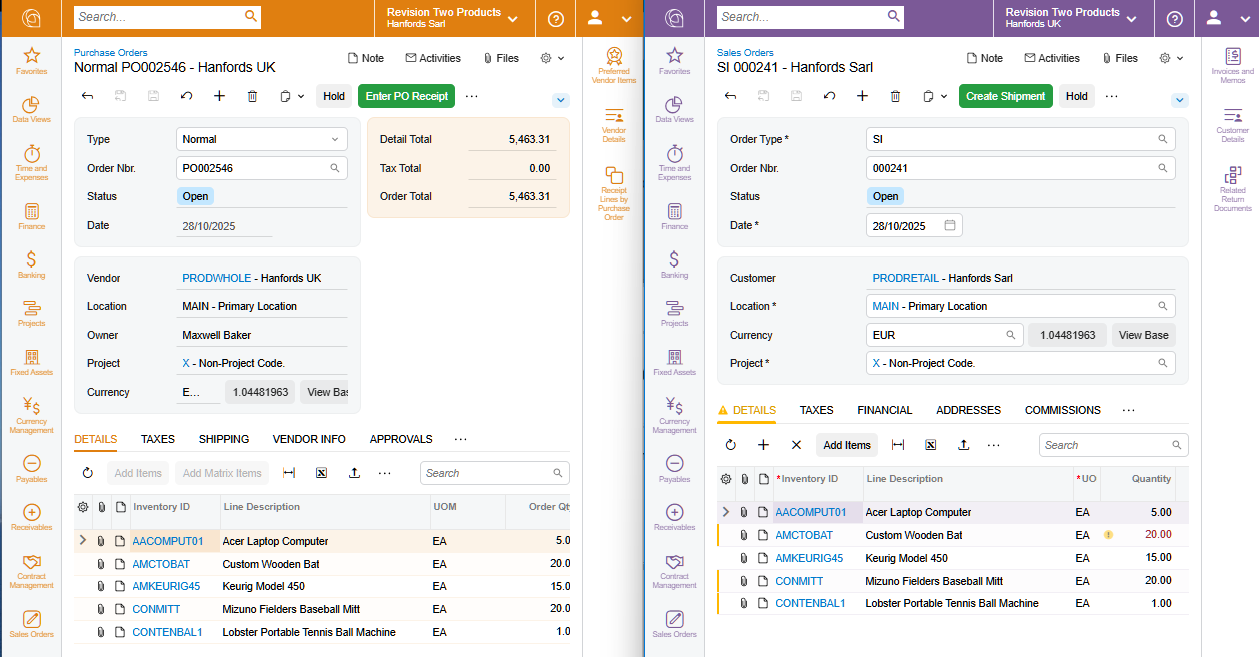
Share customers and vendors across business entities and automate financial transactions between companies for buy-sell transactions.
Key business benefits
Related Resources
Automate Financial Reporting, Payments, and Intercompany Goods Transfers across Related Companies
Track financials and create reports for an unlimited number of related companies within your organisation. Related companies with the same charts of accounts, financial periods, and currencies benefit from real-time consolidation reports. Intercompany transactions are automatically calculated between related companies for both financial and inventory-related transactions. This allows you to seamlessly manage centralised bill payment, shared customers, intercompany journal transactions, intercompany goods transfers, and more.
KEY FEATURES OF INTER-COMPANY ACCOUNTING
• Company-based reporting. Maintain individual ledgers for each company. You can eliminate intercompany transactions automatically when reporting across multiple companies.
Centralised payments. Let companies purchase goods and services that are approved and paid for by other companies. Generate profitability reports that reflect the purchase at the company level.
Centralised invoicing. Initiate sales orders from one company that are invoiced and collected by a centralized accounting team from a different company.
Inventory assignment. Assign warehouses and inventory to specific companies. Inventory transfers initiate intercompany transfers to preserve company-level reporting.
Now we can charge items across branches and automatically track how much one entity owes the other. Before, we had to do multiple entries or cut multiple checks.
–Matt Stoner, CFO, Dakota Red Corporation
Account-Based Controls
Reduce potential errors by allowing intercompany transactions only for specific accounts.
Centralised Purchasing and Invoicing
Centralise purchasing and invoicing through integrated AP, AR, and Sales Order Management. Purchase items and create sales orders in other companies with appropriate approvals.
Company Bank Accounts
Link bank accounts to specific companies for their exclusive use. Assign cash accounts to specific companies in the Cash Management module.
Asset Transfers
Assign and track fixed assets to specific companies in the Fixed Asset Management module. Transfer assets and bring depreciation and purchase history to the receiving company.
Account Allocations
Allocate accounting transactions among companies for shared activities. Perform allocations automatically according to pre-set definitions.
Role-Based Access
Create roles and groups of users that have access to specific companies and the associated transactions. Add users in seconds and maintain an audit trail of user activities.
Close Financial Periods by Company
Manage financial periods separately for each company. Activate and deactivate financial periods for posting for a particular company, and close books separately in each company within the tenant.
Company and Branch Selection
Navigate between companies and branches that represent separate legal entities, as well as companies with branches that exist within the same legal entity.
Cross Company Sales
Support cross company sales. When companies within a tenant buy and sell services from one another, once an AR invoice is created in one company, the system can automatically create an AP bill in the corresponding Acumatica entity and link the documents together.
Different Financial Calendars
Manage various financial calendars. Companies that have multiple legal entities within the same tenant can have different fiscal year-end dates. Accelerate implementation, simplify maintenance for companies that share vendors and employees, and facilitate the preparation of consolidated financial statements.