
Customer Self Service Portal
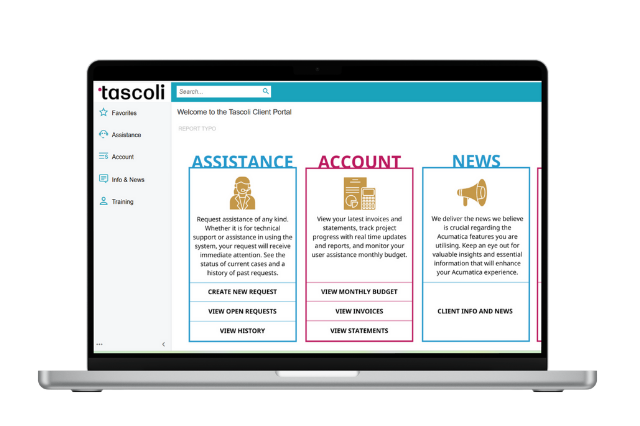
Acumatica Customer Self-Service Portal enables customers to access account information, including contracts, financial statements, support cases, and key information. Communicate more efficiently and effectively with customers. The portal works with Acumatica modules, such as CRM and Order Management.
Key business benefits
Related Resources
Empower Customers with Secure 24/7 Account Self-Service Access Online
Acumatica Customer Portal, part of the Customer Management Suite, enables you to create a customer portal experience to efficiently communicate with customers and streamline customer service.
REDUCE STAFF WORKLOADS AND INCREASE CUSTOMER SATISFACTION
Empower your partners and customers. Helpful tools enable customers to see all the relevant information about their interaction with your organization and perform account-related activities online. You can also reduce customer support questions by providing anytime access to your knowledge base and document sharing.
Leverage your Acumatica investment. Deliver even greater value to those you serve by offering new ways for them to access information and perform critical activities. Acumatica Portals use the same database and interface as your own Acumatica instance, so you can efficiently create online experiences, including B2B ordering and self-service access customer portals.
Streamline payments and improve customer satisfaction with online payments. Deliver payment flexibility by enabling customers to submit payments anywhere, anytime. Customers can view invoices, make payments, and store credit cards on the Acumatica Portal.
Share documents with customers through secured portal. Provide a secure location to share marketing materials, education materials, company policies, and FAQs with customers.
I am excited to explore the self-service customer portal solution. It’s possible we could use the portal for statements, billings, and collections so our customers and agencies we deal with feel like they are part of the process and are more in the loop on their project status.
–Eric Hugunin, Chief Operating Officer, Phoenix Renovation and Restoration
Customer Self-Service Capability
Grant customers 24/7 access to their account information, create and manage support cases, and create and track online orders—all without picking up the phone or sending an email.
Financial Overview
Give customers access to all historical documents, contracts, balances, due dates, payments received, and amounts due.
Up-to-date Pricing and Inventory
Ensure accurate inventory and pricing are always displayed because it is connected to the same database as your Acumatica Distribution Management applications.
Case Management
Allow customers to submit new cases, which seamlessly flow into ERP. View submitted cases, track each case’s status, provide additional information when required, and reopen closed cases.
Knowledge Base
Search for answers to questions. Customer self-service and generating fewer support calls.
Document Sharing
Provide a secure location to share documents with customers, such as marketing material, educational material, company policies, and FAQs, without building a separate web page.
Online Ordering
Let business partners browse inventory and place orders online 24 hours a day, 7 days a week. The customer can track the status of the order, shipments, and invoices.
Online Catalogue
Give customers access to the products you sell with their descriptions and images. You control which products are visible to each user and which warehouses goods can be shipped from which location.
Online Payments
Enable customers to make payments, view invoices, and store credit cards on the Acumatica Portal.
Personalised Portal
Add corporate branding and user define fields, provide useful information to your customers such as reporting and analysis and keep relevant information easily accessible.